YouTube transcripts without timestamps: clean, readable paragraphs
If you have ever copied a YouTube transcript, you know the result: a time code every few seconds and a line break every few words. That format exists because captions are designed to appear on screen in small pieces. It is fine for following a video, but painful to read as text. Here is how to get clean paragraphs instead.
What a raw transcript looks like
0:01
welcome back to the course today we look
0:04
at what happens in the first few seconds
0:07
after you learn something new
And what you probably want:
Welcome back to the course. Today we look at what happens in the first few seconds after you learn something new.
Method 1: Turn timestamps off in YouTube
In YouTube's transcript panel (description → Show transcript), open the panel's menu and choose Toggle timestamps. The times disappear, but each caption is still its own short line. You can then paste the text into a document and join the lines with your editor's find-and-replace (replace line breaks with spaces). This is fine for a single video.
Method 2: Download paragraphs directly
In TranscriptBinder, timestamps are off by default. The short caption lines are joined into sentences and grouped into paragraphs, so the Word booklet, PDF, TXT and Markdown files read like an article.
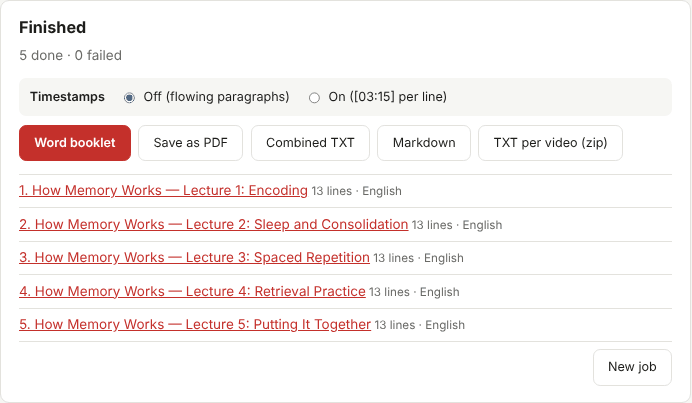
You can switch to On ([03:15] per line) before downloading if you need times — for example to jump back to a scene, to write video chapters, or to cite a moment precisely. The switch only changes the export; you do not need to collect the videos again.
How the paragraphs are made
Caption lines are joined into one stream of text, then split into paragraphs of a few hundred characters at sentence endings or at the natural pauses between captions. Sound labels such as [Music] or [Applause] are removed, and Japanese and Chinese text is joined without extra spaces. The words themselves are never changed, so you can still search for any phrase you heard in the video.
Method 3: Clean up a caption file yourself
If you have an .srt or .vtt caption file (for example from YouTube Studio for your own video), you can make paragraphs with a text editor: delete the numbered lines and the time ranges, then replace the remaining line breaks with spaces and add paragraph breaks where the topic changes. For one file this takes a few minutes; for a series it is faster to collect the videos again with timestamps off.
When to keep timestamps
| Task | Timestamps |
|---|---|
| Reading, studying, summarizing | Off |
| Feeding the text to an AI tool | Off (fewer tokens, cleaner input) |
| Making chapters for your own video | On |
| Quoting a specific moment in research | On, or note the time separately |
| Language practice with shadowing | On, so you can find the audio |
About punctuation
Captions written by the creator usually have proper punctuation. YouTube's automatic captions sometimes have little or none, which makes long blocks of text. When punctuation is missing, the paragraphs are still grouped, but sentences may run together. Two tips:
- Choose a video's original language rather than a translation; original captions are usually cleaner.
- If you need polished text, ask an AI tool to "add punctuation and paragraph breaks without changing any words", then check the result. See analyzing a booklet with AI.