Save YouTube transcripts as a printable PDF
Some people think better with paper: a printed transcript can be underlined, annotated and read away from the screen. A PDF is also the easiest format to read on a tablet or e-reader. This guide shows how to make a tidy PDF from one video or a whole series, and how to set up printing so it looks good.
Option A: Save as PDF directly
- Collect the videos in the dashboard (paste the links and press Start).
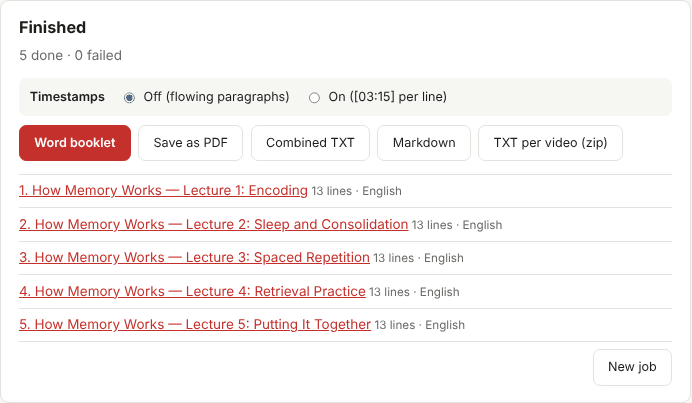
- On the finished screen, choose whether you want Timestamps on or off.
- Press Save as PDF. A print-ready page opens in a new tab and your browser's print dialog appears.
- In the print dialog, set Destination to Save as PDF and press Save.
If nothing opens, your browser may have blocked the pop-up. Allow pop-ups for binder.hogisimlab.com and press the button again.
Option B: Go through Word
If you want to edit before printing — delete the intro of every episode, add your own headings, change the font — download the Word booklet first. Open it in Microsoft Word, Google Docs, or LibreOffice, make your changes, then use File → Save as / Download → PDF. The table of contents and page breaks carry over.
Print settings that work well
| Setting | Suggestion | Why |
|---|---|---|
| Paper size | A4 | The PDF page is laid out for A4; on Letter paper choose "Fit to page" |
| Margins | Default | Leaves room for notes |
| Headers and footers | Off | Removes the browser's date and address lines |
| Two-sided | On, if your printer supports it | Halves the paper for long courses |
| Timestamps | Off for reading, On for reviewing a video | Paragraphs read faster; times help you jump back to a scene |
Reading on a tablet
A PDF keeps the same pages on every device. Send it to your tablet with your usual cloud drive and open it in a PDF app that supports highlighting. Because each video starts on a new page, the table of contents works as a quick index of the series.
Tips for a better PDF
- Split very large collections. A 300-video channel makes a very long PDF. Collect it in a few jobs (for example by playlist or by year) so each file stays easy to handle.
- Check the language. If a video was transcribed in an unexpected language, run it again with a fixed language in the dashboard.
- Keep the links. Each video section includes its YouTube link, so you can always go back and check the original.
Respect the creators
A transcript PDF is for your own study. Please do not share it publicly, sell it, or present someone else's words as your own. When you quote a talk in your work, cite the video.