Get a YouTube transcript in another language
Maybe you follow a Japanese lecture series but read English more comfortably, or you want a Korean talk as Korean text for language practice. YouTube often has captions in several languages for the same video. This guide explains which language you will get and how to choose.
Original language first (the default)
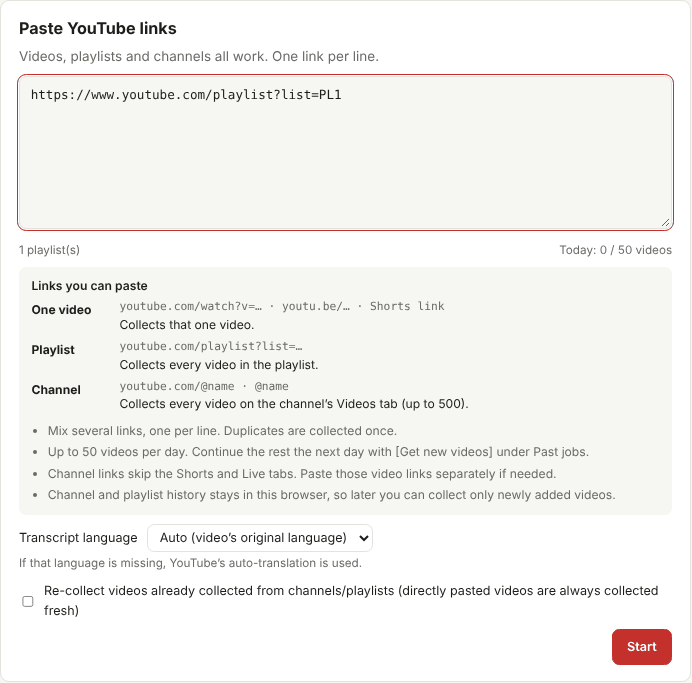
In the dashboard, Transcript language is set to Auto (video's original language). For each video, TranscriptBinder works out the language that is actually spoken and collects the transcript in that language. This gives the most faithful text, because nothing has been translated.
To decide the original language it looks, in order, at the video's original audio track, the characters in the title, the automatic captions, and YouTube's default caption track. In a mixed collection — say, English and Korean videos in one playlist — each video keeps its own language.
Choosing a language
Pick English, 한국어, 日本語 or 中文 (繁體) from the menu before you press Start. For each video:
- If a caption track in that language exists (made by the creator or by YouTube), it is used.
- If not, YouTube's automatic translation of the original captions is used.
How good is automatic translation?
Machine translation of captions is usually good enough to follow the ideas of a talk, but it inherits every mistake of the original captions and adds its own: idioms are translated literally, names may be "translated", and short caption fragments lose context. Treat it as a reading aid, not as a quotable translation. When accuracy matters, collect the original language and translate important passages carefully.
Tips for language learners
- Collect the same video twice — once in the original language, once in your language — and read them side by side. Paste the video link again with a different language selected; directly pasted videos are always collected fresh.
- Keep timestamps on for shadowing practice, so you can find each line in the audio.
- Prefer creator captions in the language you are learning; automatic captions may teach you misheard words. See how accurate captions are.
- Build a vocabulary list by asking an AI assistant to list unfamiliar words from the original transcript, with example sentences taken from the text.
Tips for researchers
- Cite the original-language wording, and mark any translation as your own or as machine translation.
- Each section of the booklet lists the video's title, channel, date and link, plus the transcript language, so your sources stay traceable.
Changing the interface language
The dashboard itself is available in English, Korean, Japanese and Traditional Chinese — use the language menu at the top right. This only changes the buttons and messages, not the transcript language.